пн, 19 янв. 2026 г., 06:42 Andrew Wesly <[email protected]>:
Hello Andrew,
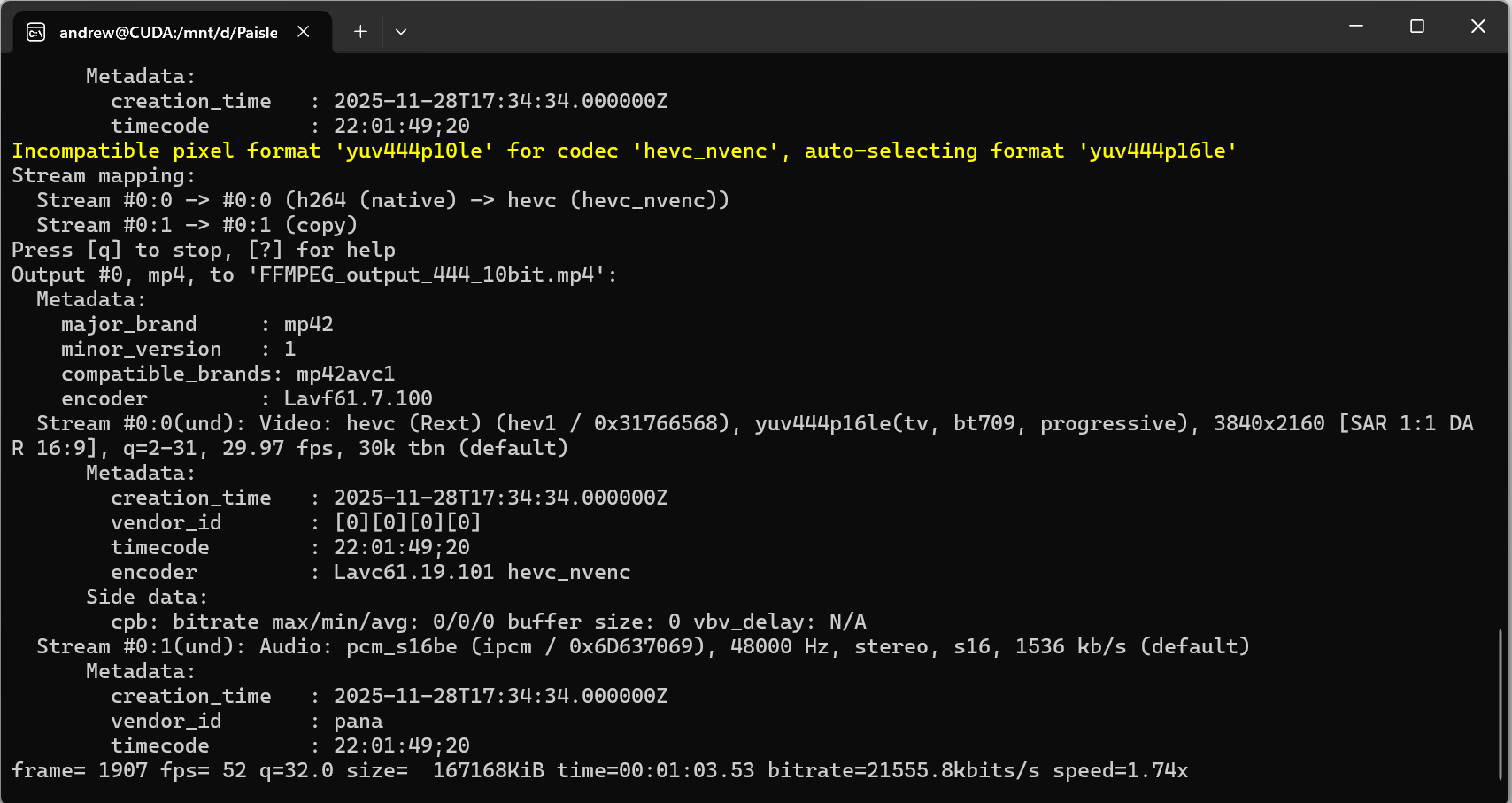
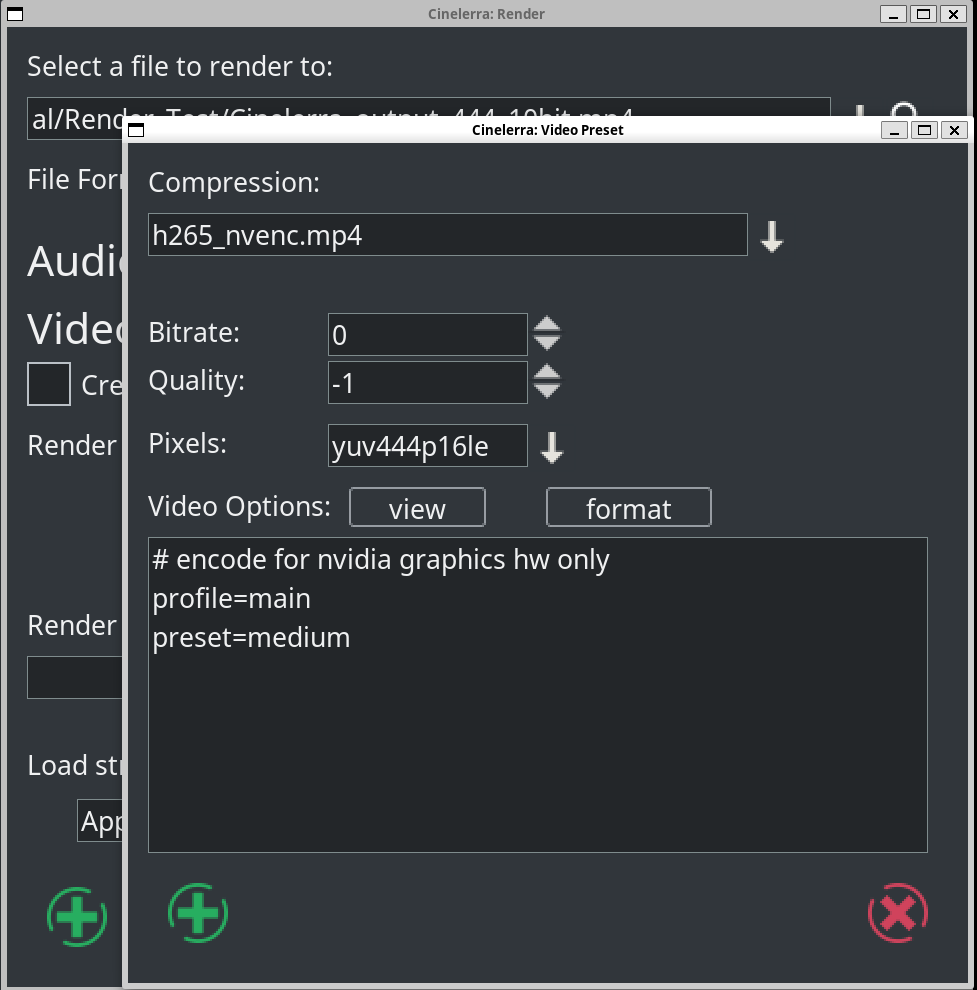
In regards to your question, so I used yuv444p10le on the command line, however if you look in the screenshot, FFMPEG autocorrected it to yuv444p16le therefore the Cinelerra and FFMPEG formats are equivalent (yuv444p16le). My mistake for the typo. My raw video footage is in a 10bit-wide colorspace.
Thanks very much for your response, Andrew. Based on your explanation, it looks like Cinelerra is working as expected, it's just that FFMPEG and Cinelerra use a different rendering algorithm if I understand correctly. Quick follow-up question for you - I'm currently using an NVIDIA RTX3070 Laptop GPU for my rendering. How likely is it that upgrading to a later series GPU such as an NVIDIA 5000 series GPU would accelerate the rendering speed?
It really depends on drivers (proprietary in this case), and speed of bus (pcie?) connecting gpu to rest of the system, and of course how powerful nvenc block on upgraded GPU ... I guess best way to test is to get your software environment as live image (say Fedora installed on usb flash/external hdd) and try this on specific computer before upgrading your own ....
Many thanks, Andrew Wesly
On Sun, Jan 18, 2026 at 6:55 PM Andrew Randrianasulu < [email protected]> wrote:
On Mon, Jan 19, 2026 at 1:55 AM Andrew Wesly via Cin < [email protected]> wrote:
Hello everyone,
I really do appreciate the prompt support especially since it's over the weekend. So, yes this is part of using CUDA to render video on Fedora in WSL. I've tried compiling Cinelerra on Fedora within WSL on my NVIDIA GeForce RTX machine and for some reason the LADSPA dependency will not install. I'm not sure what the issue was. As part of a workaround I tried using Fedora natively on my machine in case WSL was the issue. However, there were issues with me compiling Cinelerra on Fedora due to issues installing dependencies with the configuration script; it, the script seemed to not want to work with my version of Fedora due to downloading dependencies.
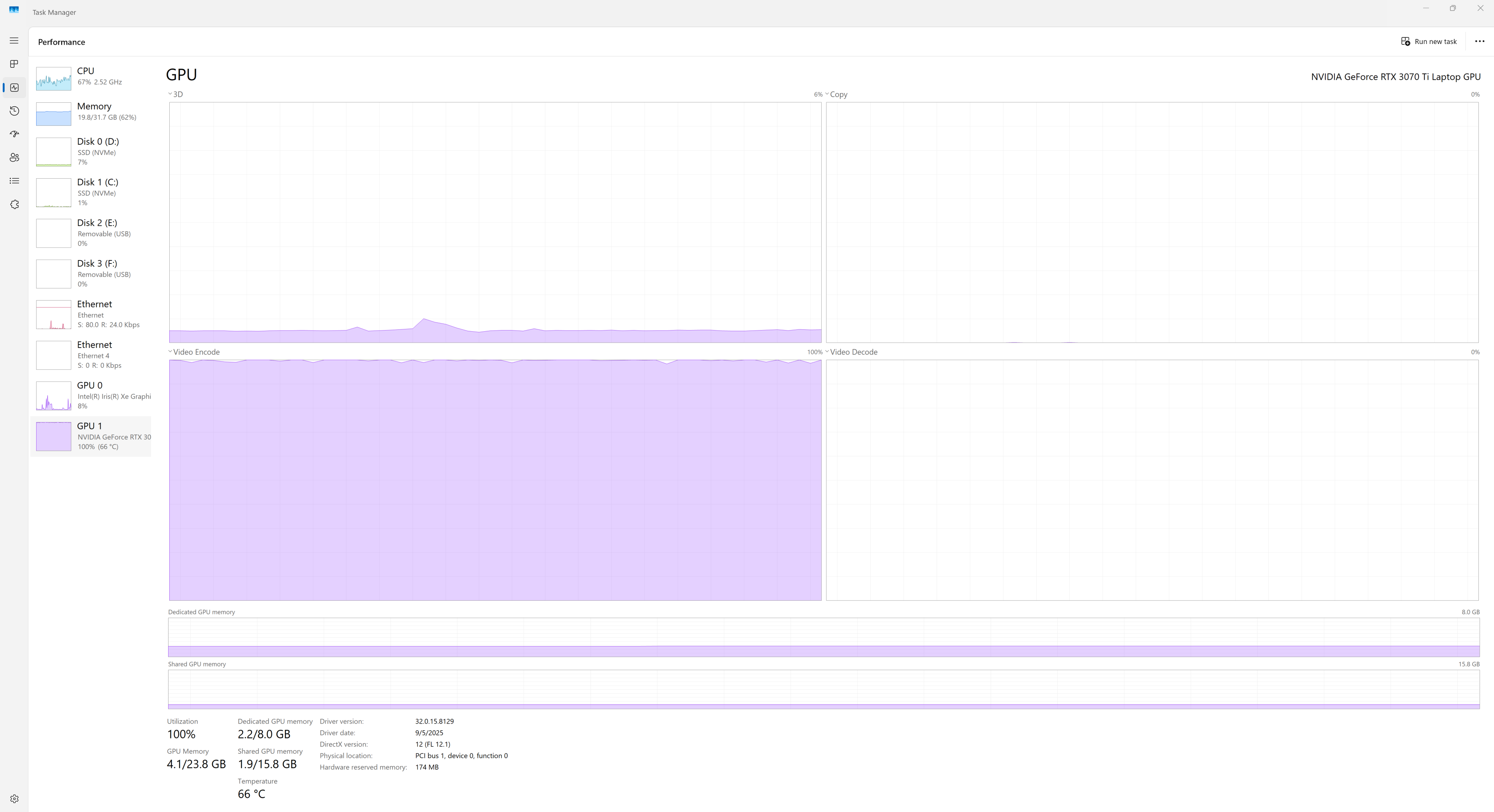
Upon digging further, I can see that FFMPEG on WSL is able to successfully render video on my machine at a 1.5 to 1.75 speed up. The input video is 4K YUV4:2:2 video with 10-bit color resolution in MP4 format. Here is the command run in wsl (Fedora): "ffmpeg -y -i CINELERRA_FFMPEG_DEBUG_DUMMY_FILE.MP4 -c:v hevc_nvenc -pix_fmt yuv444p10le -profile:v main10 -cq 20 -preset p5 -c:a copy FFMPEG_output_444_10bit.mp4" [image: image.png] As we can see the speed up is 1.74x and in Windows Task manager we see the GPU gets pegged as expected: [image: image.png]
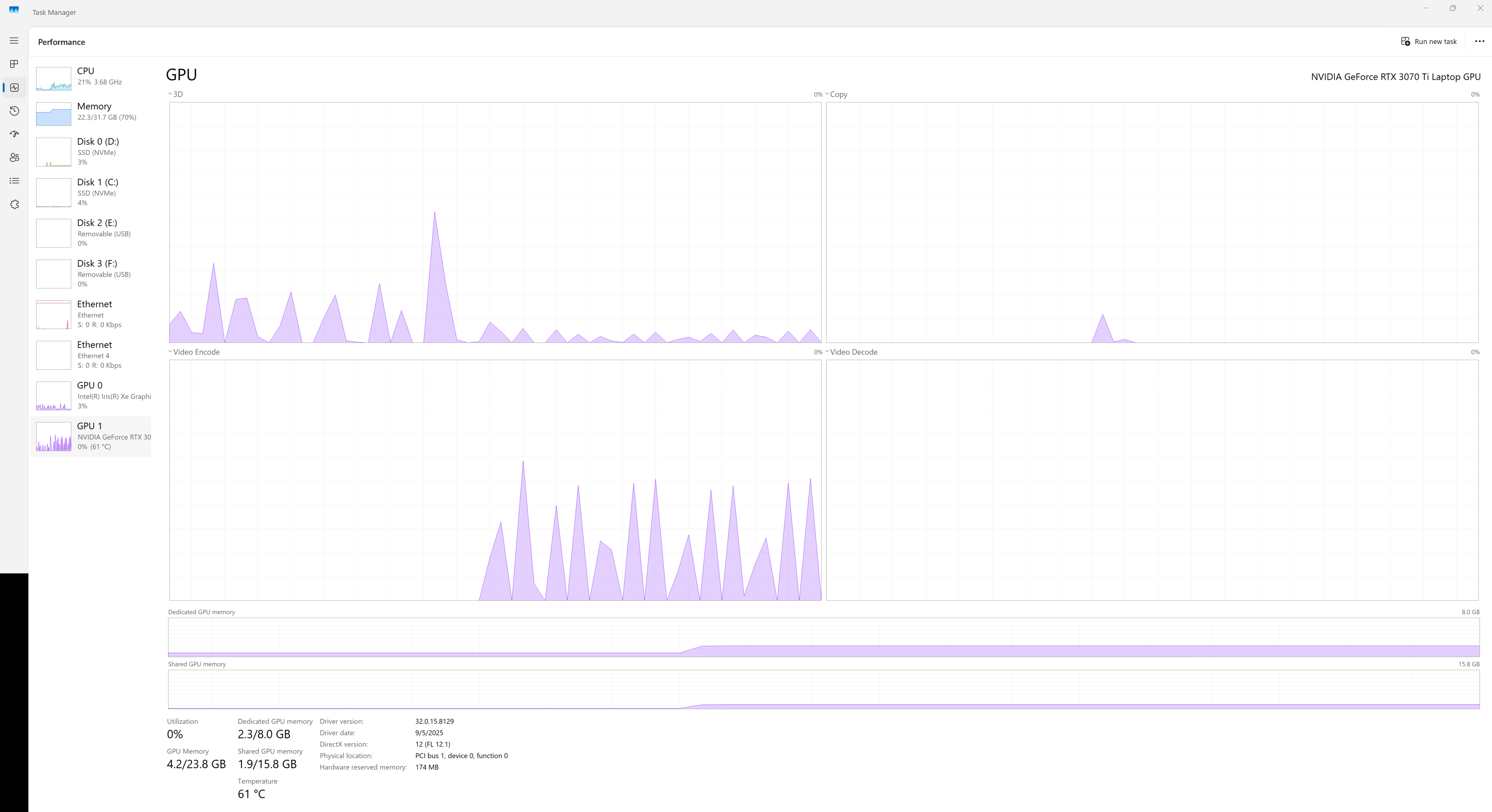
However in Cinelerra i select the h265_nvenc mp4 codec in the render profile: [image: image.png] The render rate seems to be <.5 the framerate and the GPU usage does not look right, it looks choppy: [image: image.png]
So here, it seems that Cinelerra may be using the GPU, but not optimally.
Yeah, we transfer frames into CPU memory (even if they decoded on GPU), then push them back to GPU via PCIe ...
ffmpeg probably can do its transcoding without moving frames in and out.
Also, why 444p16 in cinelerra case, when ffmpeg does just yuv444p10le ? I think it expanded to 16bit per channel inside cinelerra anyway, but not sure if picking this pixel format will make no difference, or trigger some additional conversion ?
For these reasons, I am under the assumption that:
- The issue is with the FFMPEG version that Cinelerra 5.1 uses - WSL is NOT the issue because a version of FFMPEG on the WSL environment optimally uses the GPU with the same nvenc codec.
Thoughts? Comments?
Many thanks, Andrew Wesly
On Sun, Jan 18, 2026 at 11:24 AM Terje J. Hanssen < [email protected]> wrote:
This earlier thread may be of some background interest, where Andrew Randrianasulu guided me to build Cingg from git using the system FFmpeg and libs on openSUSE Tumbleweed-Slowroll. https://www.mail-archive.com/[email protected]/msg07928.html
On 1/18/26 7:04 PM, Phyllis Smith via Cin wrote:
Forwarding to the mailing list instead of just me.
---------- Forwarded message --------- From: Phyllis Smith <[email protected]> Date: Sat, Jan 17, 2026 at 7:47 PM Subject: Re: Cinelerra FFMPEG Questions To: Andrew Wesly <[email protected]>
1. It is a little hard to say for sure depending on how the package you installed did the build. But most likely the ffnpeg routines will be in a subdirectory of something like cinelerra-5.1/thirdparty/ffmpeg-8.0 (edited - if I remember correctly, you used Andrey's Fedora build which is the best option for you)
2. Again most likely the fedora package you are using was built using its own ffnpeg routines and not your systems version. (edited - 3. You can not point to a different ffmpeg version unless you do you own build.)
For what purpose are you looking for the ffnpeg routines?
On Sat, Jan 17, 2026, 13:38 Andrew Wesly <[email protected]> wrote:
Hello Phyllis and Cinelerra Team,
I'm looking through the CinelerraGG_Manual.pdf document for information about configuring FFMPEG and I have a few basic questions for you.
1) The manual states that Cinelerra has an FFMPEG configuration directory. However, where si that directory located on default Linux installs, Fedora specifically?
2) I installed Cinelerra pre-built from a repository. What FFMPEG does it use? That is to say, if there are two or more versions of FFMPEG installed on a system, does Cinelerra come with its own FFMPEG or does it use an FFMPEG already on the system?
3) How may I point Cinelerra to a custom FFMPEG, i.e. one of a different version?
Many thanks, Andrew Wesly
_______________________________________________ Cin mailing list -- [email protected] To unsubscribe send an email to [email protected]
_______________________________________________ Cin mailing list -- [email protected] To unsubscribe send an email to [email protected]