Debian 32-bit on Qemu

I have installed a Debian 11.1 32-bit on qemu. What packages do I need in order to compile CinGG from git? I remember there used to be a dependency checking script, but I, with Arch, have never used it. Or is it better to use some other installation method?

On Monday, October 11, 2021, Andrea paz via Cin <[email protected]> wrote:
I have installed a Debian 11.1 32-bit on qemu. What packages do I need in order to compile CinGG from git? I remember there used to be a dependency checking script, but I, with Arch, have never used it. Or is it better to use some other installation method?
I think this script should give you some idea what to install: http://git.cinelerra-gg.org/git/?p=goodguy/cinelerra.git;a=blob;f=cinelerra-... cinelerra-5.1/blds/bld_prepare.sh it run as root and hopefully will just take one parameter (os type), "debian" in your case
-- Cin mailing list [email protected] https://lists.cinelerra-gg.org/mailman/listinfo/cin
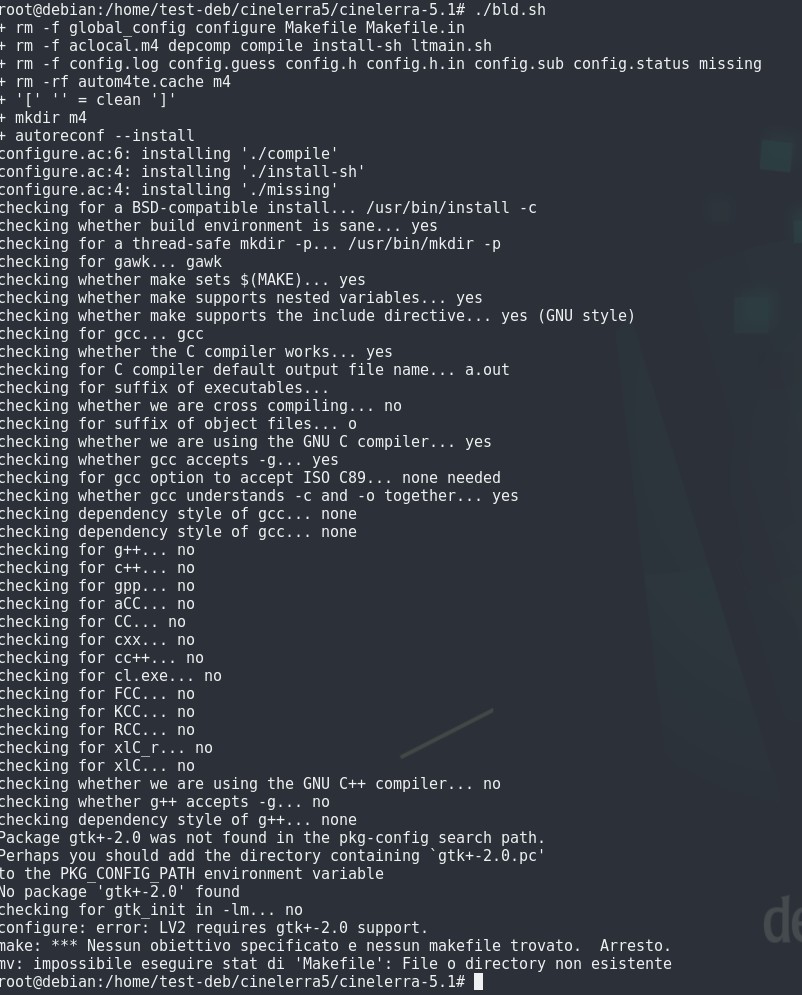
Unfortunately, the things I don't understand start. It seems that some "gtk+-2.0" is missing and the compilation fails. See image. I tried installing gtk2 but nothing changes. I think it wants a specific package, but I don't understand which one.

On Mon, 11 Oct 2021 20:46:05 +0200 Andrea paz via Cin <[email protected]> wrote:
Unfortunately, the things I don't understand start. It seems that some "gtk+-2.0" is missing and the compilation fails. See image. I tried installing gtk2 but nothing changes. I think it wants a specific package, but I don't understand which one.
On Debian, install apt-file if not yet done. Then do "apt-file update" . After that, "apt-file find gtk2" , it should list all installable packages with gtk2. I am not sure Debian has a graphical package installer, that is easier, but I use apt-file a lot. I have read something about gkt2 possibly being dropped, not sure how far that got. MatN
On Monday, October 11, 2021, Andrea paz <[email protected]> wrote:
Unfortunately, the things I don't understand start. It seems that some "gtk+-2.0" is missing and the compilation fails. See image. I tried installing gtk2 but nothing changes. I think it wants a specific package, but I don't understand which one.
https://unix.stackexchange.com/questions/344206/how-to-install-gtk2-0-on-deb... try libgtk2.0-dev (apt install libgtk2.0-dev)?
I was able to compile CinGG and make a valgrind (with libgl). But there are several problems on the screen: every time I opened a window (Info; Error Messages; preferences; etc) they couldn't be closed anymore; even exiting CinGG was impossible and I had to use ctrl+c. val-deb-1.log is done trying to load a mov file directly into timeline; operation failed. val-deb-2.log is done trying to import a h264 file in the resource window: successful operation. Trying to drag the file to the timeline created the two audio tracks but not the video track which gave an error message. I also attach the terminal messages (terminal 1 + error message + terminal 2).
On Tuesday, October 12, 2021, Andrea paz <[email protected]> wrote:
I was able to compile CinGG and make a valgrind (with libgl).
Cool! (and thanks for extreme patience!). At least now we know it works with normal linux x86-32. It sadly still aborts here in termux/arm32, but then I guess this is separate problem... most (possible?) errors seems to be from glx library or normal thread creating mechanism... I need to learn how to filter such output....
But there are several problems on the screen: every time I opened a window (Info; Error Messages; preferences; etc) they couldn't be closed anymore; even exiting CinGG was impossible and I had to use ctrl+c. val-deb-1.log is done trying to load a mov file directly into timeline; operation failed. val-deb-2.log is done trying to import a h264 file in the resource window: successful operation. Trying to drag the file to the timeline created the two audio tracks but not the video track which gave an error message. I also attach the terminal messages (terminal 1 + error message + terminal 2).
those errors only exist under valgrind?
@Andrea, good that you can build it now, but I was surprised you had problems. I tried to re-create them, and it worked first time. I used VirtualBox instead of Qemu, but for the procedure that should not make a difference. I have documented the procedure I followed, see below. MatN ========================================================== 1. Download and verify DVD for Debian 11, i386. 2. In VirtualBox, create new VM for this, 30 G dynamic disk. - System: 4G memory, no floppy boot, PS/2 mouse, I/O APIC enabled. 4 CPUs. - Storage: insert Debian ISO file into optical drive. - Audio in/out enabled. - USB 2 - Shared folders: user's Public folder. 3. Start VM, install Debian, desktop XFCE. Select external repository when asked for. 4. Reboot Debian, use root to add user to sudo group. Logout, login (pick up sudo group). 5. In Applications->System->Synaptic, remove ISO file from Repositories. From file manager, eject the ISO. 6. In terminal, do "sudo apt update", if any are upgradable do "sudo apt upgrade". 7. Determine where to keep AppImages (you need an external AppImage to build CinGG's AppImage). It must be a directory in your PATH; one place is /usr/bin. On some systems, ~/bin and/or ~/.local/bin will automatically be added to the PATH is they exists during login. Create e.g. ~/bin . This works for me on Mint, not on my Debian 11 even though it should (see ~/.profile). So I add them to /usr/bin for now. If needed, logout/login to pick the new directory up. 8. In terminal, do "sudo apt install git" . 9. Create directory to receive the CinGG source in, say cinelerra5. Then do "git clone --depth 1 "git://git.cinelerra-gg.org/goodguy/cinelerra.git" cinelerra5 " to retrieve the source. Adapt the destination directory as desired if not cinelerra5. 10. Go to cinelerra5/cinelerra5.1. Do "sudo blds/bld_prepare.sh debian". This will install all needed development packages. (This worked first time for me). 11. Do "cp blds/bld_appimage.sh", also copy blds/bld_static.sh. The appimage script is not executable yet, do "chmod a+x bld_appimage.sh". 12. Edit both bld_** scripts to remove the automatic retrieval of the latest source, which works for root only. In bld_static.sh, delete everything above the opening '{' just before ./autogen.sh . 13. Now do "./bld_static.sh" . It should build single-user CinGG. At the end of the build, the terminal will show the result from trying to find the string "error:" in the log, there should be no errors. Go to the bin directory, and do "./cin" . It should start normally. This proves your build environment is OK. 14. Install the "linuxdeplay" AppImage. get it from https://github.com/linuxdeploy/linuxdeploy/releases/continuous (see the bld_appimage.sh script). For 32 bit, you need the i386 AppImage. Place it in the directory you have choosen, and set it executable: "chmod a+x linuxdeploy-i386.AppImage". Test if it is in the path by going to one of your directories, and type "linuxd " followed by a tab. That will expand the full name. Hit enter, you should get some help text on the screen. If so, you are ready to build the CinGG AppImage. 15. For 32 bit systems, modify the bld_appimage.sh script to not use "linuxdeploy-x86_64.AppImage" but "linuxdeploy-i386.AppImage" . 16. In directory cinelerra5.1, do "./bld_appimage.sh" . This will basically do the same static build, but package it as AppImage; and because the static is already build, it goes through the building step very quickly. Then it will create the AppImage. It will appear in the cinelerra5.1 directory as cin-....i386.AppImage . You can now run it as ./cin- (tab) and enter. For VirtualBox, if you want full back-and forth between host and client (shared directories), install the guest additions. Also, typing in a terminal is slow sometime otherwise. ==========================================================
@MatN I more or less did your initial steps, but did not create the appimage. I didn't even know you could do a valgrind with an appimage. I did everything from root with "su" and didn't put "sudo". 10) bld_prepare.sh debian works fine except for libgl not being installed. I finally found that "apt install libgl-dev" works. Other packages I had to install externally to bld_prepare.sh are: gawk; make; libgtk2.0-dev (only gtk2 won't do); and of course: git; gdb and valgrind. As I told Andrew, CinGG works just fine in my 32-bit debian 11; it's only with valgrind that so many problems come up (which never occurred in my Arch). I guess the valgrind + vm combination is fatal. PS: the instructions to use valgrind were given to me by GG (all from root): 1- git clone ... cinelerra5 2- copy cinelerra-5.1 folder in /tmp 3- cd /tmp/cinelerra-5.1 4- ./bld.sh 5- CFLAGS=-ggdb make -j16 rebuild_all 6- valgrind -v --log-file=/tmp/val.log --leak-check=full --num-callers=32 /tmp/cinelerra-5.1/bin/./cin 7- in val.log look for "error" and "illegal" words. With the same procedure you can start gdb instead of valgrind. PPS: thanks for the procedure to create the appimage; I saved it and will try to do it sometime.

On 2021. 10. 11. 16:55, Andrea paz via Cin wrote:
I have installed a Debian 11.1 32-bit on qemu. What packages do I need in order to compile CinGG from git? I remember there used to be a dependency checking script, but I, with Arch, have never used it. Or is it better to use some other installation method?
ld cin gives me the following: linux-vdso.so.1 libX11.so.6 libXext.so.6 libXinerama.so.1 libXfixes.so.3 libbz2.so.1.0 libfontconfig.so.1 libfreetype.so.6 liblzma.so.5 libpng16.so.16 libpthread.so.0 libz.so.1 libjbig.so.0 libvdpau.so.1 libGL.so.1 libGLU.so.1 libXv.so.1 libXft.so.2 libasound.so.2 libpulse-simple.so.0 libpulse.so.0 libdl.so.2 libnuma.so.1 libstdc++.so.6 libm.so.6 libmvec.so.1 libgcc_s.so.1 libc.so.6 libxcb.so.1 libexpat.so.1 libuuid.so.1 libbrotlidec.so.1 /lib64/ld-linux-x86-64.so.2 libGLdispatch.so.0 libGLX.so.0 libXrender.so.1 libpulsecommon-14.2.so libdbus-1.so.3 libXau.so.6 libXdmcp.so.6 libbrotlicommon.so.1 libsystemd.so.0 libwrap.so.0 libsndfile.so.1 libasyncns.so.0 librt.so.1 libbsd.so.0 libzstd.so.1 liblz4.so.1 libgcrypt.so.20 libnsl.so.2 libFLAC.so.8 libvorbis.so.0 libvorbisenc.so.2 libopus.so.0 libogg.so.0 libresolv.so.2 libmd.so.0 libgpg-error.so.0 libtirpc.so.3 libgssapi_krb5.so.2 libkrb5.so.3 libk5crypto.so.3 libcom_err.so.2 libkrb5support.so.0 libkeyutils.so.1 I hope that helps. And it compiles (with some options disabled) on my debian 64 bullseye. br andrás
This one contains, I think, all the needed package with my configure options. On 2021. 10. 11. 16:55, Andrea paz via Cin wrote:
I have installed a Debian 11.1 32-bit on qemu. What packages do I need in order to compile CinGG from git? I remember there used to be a dependency checking script, but I, with Arch, have never used it. Or is it better to use some other installation method?
I tried replacing the configure.ac but the compilation keeps failing. I attach the configure.log where you can see that the error is about gcc. But I have no idea how to fix it.
participants (4)
-
 Andrea paz
 -
 Andrew Randrianasulu
 -
 mnieuw@zap.a2000.nl
 -
 Reuss András