Qt6 Alpha 2026-10-22 ready for testing, native Wayland included

Hi everyone, A new Qt6 alpha build is up, dated 2026-10-22. It is ready for you to test. Download (two AppImages, pick one): https://download.cinelerra-gg.org/?path=qt6-alpha&sort=date_desc - CinGG-qt6-alpha-20261022-x86_64.AppImage: for current distributions (glibc 2.38 or newer, e.g. Fedora 40+, Ubuntu 24.04+). - CinGG-qt6-alpha-20261022-anylinux-x86_64.AppImage: brings its own glibc and runs on older systems as well (tested on Ubuntu 16.04, 22.04 and Debian 12). A .sha256 file sits next to each. Help → About should show "built: Oct 22 2026". What's new since 2026-10-19: - Native Wayland support. This is the main thing we'd like you to try. - Mirror effect: no more garbage when the reflection center is near 50 %. - Sketcher and plugin parameter panels: one line per parameter, no horizontal scroll bar, theme accent colours. - Floating docks can be docked again from their title bar menu. How to test native Wayland: By default Cinelerra still starts through XWayland, even in a Wayland session. To run natively, start it like this: CIN_QPA_PLATFORM=wayland ./CinGG-qt6-alpha-20261022-x86_64.AppImage The terminal prints which platform was chosen. Please tell us which desktop you used, e.g. KDE Plasma, GNOME, Sway or Hyprland. So far we have only tested under KWin, so the others matter most to us. Things worth trying under Wayland: - dragging clips from Resources to the timeline, the viewer and the bins - floating docks: detach, move, re-dock, restart - dialogs and popup menus: do they open in the right place and stay in front? - Alt+T drag box, colour picker, right-click menus in older plugin windows - fullscreen Known issues, no need to report them: - Screen capture does not work under native Wayland yet. - On exit under Wayland, cin may print a "core dumped" message. - A floating dock can flicker once at startup. - Once the mixer window is behind the main window, there is no menu entry to bring it back. Please report bugs in the "Qt6 Alpha" category of the bug tracker: https://bug.cinelerra-gg.org Please include your distribution, your desktop, whether you ran native Wayland or X11, and the terminal output if something goes wrong. Thanks a lot for testing! Sam

Hi, I have just tested basic startup using CIN_QPA_PLATFORM=wayland ./CinGG-qt6-alpha-20261022-x86_64.AppImage working with Wayland cin: display platform wayland (CIN_QPA_PLATFORM) on two current openSUSE distributions Tumbleweed-Slowroll ------------------- gnome-shell --version GNOME Shell 50.5 echo $XDG_SESSION_TYPE wayland openSUSE Leap 16.1 ------------------ gnome-shell --version GNOME Shell 48.8 echo $XDG_SESSION_TYPE wayland Comments The default gui and fonts are too small compared with Cin running in XWayland mode on an 27" display with 2560 × 1440WQHD resolution Thanks, Terje J. H On 23.10.2026 22:39, Sam via Cin wrote:
Hi everyone,
A new Qt6 alpha build is up, dated 2026-10-22. It is ready for you to test.
Download (two AppImages, pick one): https://download.cinelerra-gg.org/?path=qt6-alpha&sort=date_desc
- CinGG-qt6-alpha-20261022-x86_64.AppImage: for current distributions (glibc 2.38 or newer, e.g. Fedora 40+, Ubuntu 24.04+). - CinGG-qt6-alpha-20261022-anylinux-x86_64.AppImage: brings its own glibc and runs on older systems as well (tested on Ubuntu 16.04, 22.04 and Debian 12).
A .sha256 file sits next to each. Help → About should show "built: Oct 22 2026".
What's new since 2026-10-19:
- Native Wayland support. This is the main thing we'd like you to try. - Mirror effect: no more garbage when the reflection center is near 50 %. - Sketcher and plugin parameter panels: one line per parameter, no horizontal scroll bar, theme accent colours. - Floating docks can be docked again from their title bar menu.
How to test native Wayland:
By default Cinelerra still starts through XWayland, even in a Wayland session. To run natively, start it like this:
CIN_QPA_PLATFORM=wayland ./CinGG-qt6-alpha-20261022-x86_64.AppImage The terminal prints which platform was chosen. Please tell us which desktop you used, e.g. KDE Plasma, GNOME, Sway or Hyprland. So far we have only tested under KWin, so the others matter most to us.
Things worth trying under Wayland: - dragging clips from Resources to the timeline, the viewer and the bins - floating docks: detach, move, re-dock, restart - dialogs and popup menus: do they open in the right place and stay in front? - Alt+T drag box, colour picker, right-click menus in older plugin windows - fullscreen
Known issues, no need to report them: - Screen capture does not work under native Wayland yet. - On exit under Wayland, cin may print a "core dumped" message. - A floating dock can flicker once at startup. - Once the mixer window is behind the main window, there is no menu entry to bring it back.
Please report bugs in the "Qt6 Alpha" category of the bug tracker: https://bug.cinelerra-gg.org
Please include your distribution, your desktop, whether you ran native Wayland or X11, and the terminal output if something goes wrong.
Thanks a lot for testing!
Sam
_______________________________________________ Cin mailing list -- cin@lists.cinelerra-gg.org To unsubscribe send an email to cin-leave@lists.cinelerra-gg.org
Follow-up on the GUI and Wayland testing: Testing command: * *CIN_QPA_PLATFORM=wayland QT_SCALE_FACTOR=1.4 ./CinGG-qt6-alpha-20261022-x86_64.AppImage* *Observations: DPI Scaling: * Setting QT_SCALE_FACTOR=1.4 makes the GUI size perfect on a 27" WQHD (2560x1440) display. Default scaling without this environment variable results in tiny fonts and icons. Window Management (Compositor): * Loaded a video and used Window -> Show Compositor. Moving/dragging the Compositor window felt a bit clunky initially (terminal reports: "This plugin supports grabbing the mouse only for popup windows"). * Managing the window worked via the taskbar panel (Dash to Panel), but in the Window menu, Show Compositor does not show a checkmark when the window is visible. * Clicking the Close ("X") button on the Compositor window title bar did not close the window (had to close it via the panel/taskbar). Terje On 24.10.2026 01:36, Terje J. Hanssen wrote:
Hi,
I have just tested basic startup using
CIN_QPA_PLATFORM=wayland ./CinGG-qt6-alpha-20261022-x86_64.AppImage
working with Wayland
cin: display platform wayland (CIN_QPA_PLATFORM)
on two current openSUSE distributions
Tumbleweed-Slowroll ------------------- gnome-shell --version GNOME Shell 50.5 echo $XDG_SESSION_TYPE wayland
openSUSE Leap 16.1 ------------------ gnome-shell --version GNOME Shell 48.8 echo $XDG_SESSION_TYPE wayland
Comments The default gui and fonts are too small compared with Cin running in XWayland mode on an 27" display with 2560 × 1440WQHD resolution
Thanks, Terje J. H
On 23.10.2026 22:39, Sam via Cin wrote:
Hi everyone,
A new Qt6 alpha build is up, dated 2026-10-22. It is ready for you to test.
Download (two AppImages, pick one): https://download.cinelerra-gg.org/?path=qt6-alpha&sort=date_desc
- CinGG-qt6-alpha-20261022-x86_64.AppImage: for current distributions (glibc 2.38 or newer, e.g. Fedora 40+, Ubuntu 24.04+). - CinGG-qt6-alpha-20261022-anylinux-x86_64.AppImage: brings its own glibc and runs on older systems as well (tested on Ubuntu 16.04, 22.04 and Debian 12).
A .sha256 file sits next to each. Help → About should show "built: Oct 22 2026".
What's new since 2026-10-19:
- Native Wayland support. This is the main thing we'd like you to try. - Mirror effect: no more garbage when the reflection center is near 50 %. - Sketcher and plugin parameter panels: one line per parameter, no horizontal scroll bar, theme accent colours. - Floating docks can be docked again from their title bar menu.
How to test native Wayland:
By default Cinelerra still starts through XWayland, even in a Wayland session. To run natively, start it like this:
CIN_QPA_PLATFORM=wayland ./CinGG-qt6-alpha-20261022-x86_64.AppImage The terminal prints which platform was chosen. Please tell us which desktop you used, e.g. KDE Plasma, GNOME, Sway or Hyprland. So far we have only tested under KWin, so the others matter most to us.
Things worth trying under Wayland: - dragging clips from Resources to the timeline, the viewer and the bins - floating docks: detach, move, re-dock, restart - dialogs and popup menus: do they open in the right place and stay in front? - Alt+T drag box, colour picker, right-click menus in older plugin windows - fullscreen
Known issues, no need to report them: - Screen capture does not work under native Wayland yet. - On exit under Wayland, cin may print a "core dumped" message. - A floating dock can flicker once at startup. - Once the mixer window is behind the main window, there is no menu entry to bring it back.
Please report bugs in the "Qt6 Alpha" category of the bug tracker: https://bug.cinelerra-gg.org
Please include your distribution, your desktop, whether you ran native Wayland or X11, and the terminal output if something goes wrong.
Thanks a lot for testing!
Sam
_______________________________________________ Cin mailing list -- cin@lists.cinelerra-gg.org To unsubscribe send an email to cin-leave@lists.cinelerra-gg.org

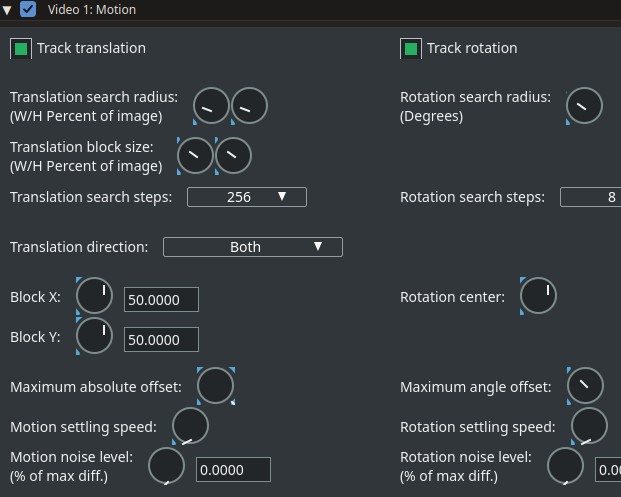
[image: motion.jpg] - In plugins that have adjustment wheels, it seems that the wheel's indicator needle isn't centered but is shifted to the lower right. As a result, the needle appears smaller and moves in a “strange” way. Speaking of plugins: it wouldn't be a bad idea to include a “reset” button in every native plugin. - Running both the AppImage and the build with the environment variable `QT_QPA_PLATFORM=wayland` always results in an X11 environment: cin: display platform xcb (X11 display) The same thing happens with the two AppImages, including the one for older systems. I use Arch Linux, KDE Plasma (Wayland). It's probably just an issue with my system, since it works fine for Terje. - With the AppImage for older systems, I don't encounter any of the issues IgorBeg found; perhaps there are still some external libraries that aren't working? At startup, I only get a few warnings about fontconfig, but they don't affect CinGG's operation. With the other AppImage and with the build, I don't get these warnings.

Thank you, Sam, for the "AnyLinux" version. I tried it, quickly, on my old Laptop with UbuntuStudio_16.04. It works and below what says terminal: === START === ./CinGG-qt6-alpha-20261022-anylinux-x86_64.AppImage ALSA lib conf.c:4037:(snd_config_hooks_call) [error.core] Cannot open shared library libasound_module_conf_pulse.so (/usr/lib64/alsa-lib/libasound_module_conf_pulse.so: cannot open shared object file: No such file or directory) ALSA lib control.c:1575:(snd_ctl_open_noupdate) [error.control] Invalid CTL hw:0 AudioALSA::list_devices card=0: No such file or directory Cinelerra 6.0 alpha - built: Oct 22 2026 21:59:58 git://git.cinelerra-gg.org/goodguy/cinelerra.git (c) 2006-2019 Heroine Virtual Ltd. by Adam Williams 2007-2020 mods for Cinelerra-GG by W.P.Morrow aka goodguy 2003-2017 mods for Cinelerra-CV by CinelerraCV team 2015-2026 mods for Cinelerra-GG by Cinelerra-GG team Libav version: Lavc61.19.101 Cinelerra is free software, covered by the GNU General Public License, and you are welcome to change it and/or distribute copies of it under certain conditions. There is absolutely no warranty for Cinelerra. qt.gui.icc: fromIccProfile: failed size sanity 2 QApplication: invalid style override 'gtk' passed, ignoring it. Available styles: Windows, Fusion cin: display platform xcb (X11 display) build plugin index for: /tmp/.mount_CinGG-fZiaCK/bin/plugins ALSA lib conf.c:4037:(snd_config_hooks_call) [error.core] Cannot open shared library libasound_module_conf_pulse.so (/usr/lib64/alsa-lib/libasound_module_conf_pulse.so: cannot open shared object file: No such file or directory) ALSA lib control.c:1575:(snd_ctl_open_noupdate) [error.control] Invalid CTL hw:0 AudioALSA::list_devices card=0: No such file or directory RenderFarmClient::main_loop: client started === END === By my quickly tests: - Drag and Drop any clip from Media (Resource window) to Viewer or Compositor window doesn't work. - Timeline-> PatchBay area, Draw Media doesn't work. - Timeline-> PatchBay, when the track is disarmed (Arm track is disabled), should not be possible insert any Autos (Fade,...). - Timeline, when in "Cut and Paste edit mode" the cursor no change its icon from Arrow to I-beam icon: so I don't know in which mode I am working. - Transport icons (Fast Rewind, Fast Forward, Play,...) too big for my screen (1920x1080px) Sorry for the fast reply. Great job, Sam. IgorB Il 23/10/2026 22:39, Sam via Cin ha scritto:
Hi everyone, A new Qt6 alpha build is up, dated 2026-10-22. It is ready for you to test.
Download (two AppImages, pick one): https://download.cinelerra-gg.org/?path=qt6-alpha&sort=date_desc
- CinGG-qt6-alpha-20261022-x86_64.AppImage: for current distributions (glibc 2.38 or newer, e.g. Fedora 40+, Ubuntu 24.04+). - *CinGG-qt6-alpha-20261022-anylinux-x86_64.AppImage*: brings its own glibc and runs on older systems as well (tested on *Ubuntu 16.04*, 22.04 and Debian 12).
participants (4)
-
 Andrea paz
-
 Igor BEGHETTO
-
 Sam
-
 Terje J. Hanssen