another web page with icc profile check

https://chromachecker.com/page/en/show/web_browser_tester works in ff 140.9.1esr (32-bit) I see "better" than sRGB images even on my 8bpc, HDMI->VGA connected monitor. But if I save two images and try to load them in cingg even compiled with lcms2 support and flags2=icc_profiles set in decode.opts I do not see any difference! cin /dev/shm/gradient\ *.jpg I toggle top track and text changes but relative width of green bar (very visible in gimp when you compare those two) does not change. So for now I think we can conclude color profiles in image actually not supported on reading/displaying ? writing ffmpeg/png with whole set of trc/primaries params (in avcodec kind of encoder params gui) gives you some embedded profile, so I think lcms2 support in embedded ffmpeg libs is working. I tried to add .opts file with video_filter=iccgen but it does not change anything :(

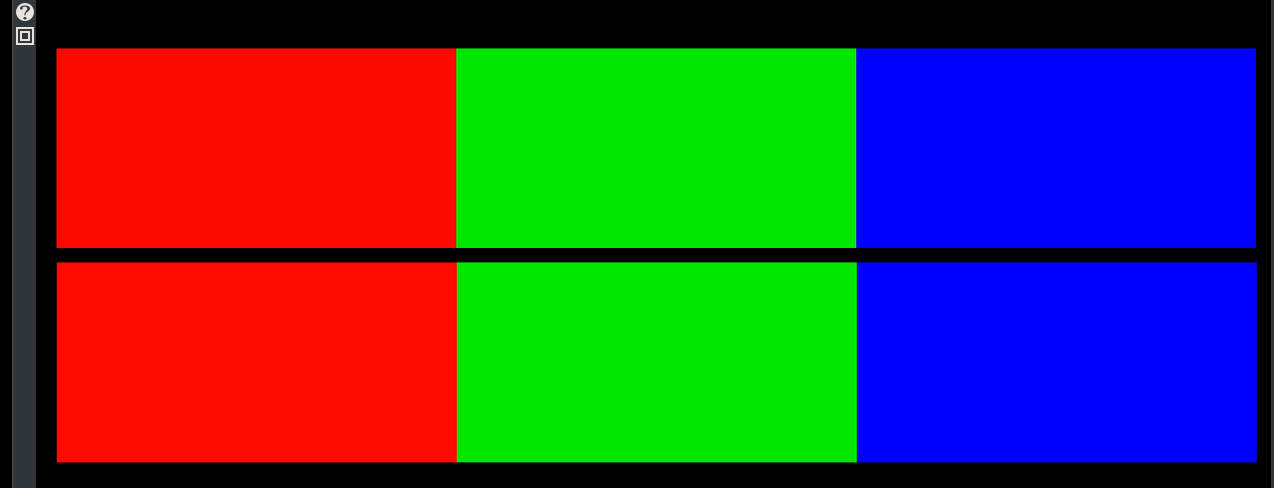
In my opinion, the behavior you've noticed indicates that CinGG is sending only sRGB signals to the monitor. It's not a matter of whether or not color management is enabled. I have wide-gamut ICC profiles set system-wide, so CinGG (or any other program) should display a wide-gamut signal if it passed the signal through unaltered, but CinGG limits it to sRGB. I’m attaching an image taken from the website https://www.wide-gamut.com/test, similar to the ChromaChecker you posted. The top color strip is wide-gamut (ProPhotoRGB); the bottom strip is sRGB. On the linked webpage, since I have a wide-gamut monitor, I can clearly see the difference between the two images: the top one is much more saturated and vibrant. In the CinGG Compositor, I don't see any difference. This fact does not limit color accuracy only when the source files are sRGB. Any other color space is reduced to sRGB, so we end up performing color correction based on an inaccurate monitor display; consequently, the corrections made would lead to an even greater discrepancy (metamerism). With BT.709, the difference may be acceptable since the gamut is the same and only the brightness (gamma) changes. With wide-gamut color spaces, the difference becomes unacceptable. What I still need to figure out is: why does changing the “YUV color space” affect the view in the Compositor? If we only ever see sRGB on the monitor, it should always look the same, and this setting would be useless (unlike “YUV color range,” which I understand does make a difference). Now I’ll try compiling with lcms2, using P3 and OCIO images, and the new parameters for zscale, to see if anything changes. I’ll let you know tomorrow.[image: Wide_Vs_sRGB.png]
On Thu, Apr 30, 2026 at 10:17 PM Andrea paz <gamberucci.andrea@gmail.com> wrote:
In my opinion, the behavior you've noticed indicates that CinGG is sending only sRGB signals to the monitor. It's not a matter of whether or not color management is enabled. I have wide-gamut ICC profiles set system-wide, so CinGG (or any other program) should display a wide-gamut signal if it passed the signal through unaltered, but CinGG limits it to sRGB. I’m attaching an image taken from the website https://www.wide-gamut.com/test, similar to the ChromaChecker you posted. The top color strip is wide-gamut (ProPhotoRGB); the bottom strip is sRGB. On the linked webpage, since I have a wide-gamut monitor, I can clearly see the difference between the two images: the top one is much more saturated and vibrant.
May be icc profile embedded in image only works in color-managed apps like browsers, image viewers ... Does it look better (than in cingg) with mpv? in other video editors based on ffmpeg ? I think we not just do not apply display part of icc (monitor profile) but also file part ... I think video terms like full/limited range does not interact directly with terms like sRGB.
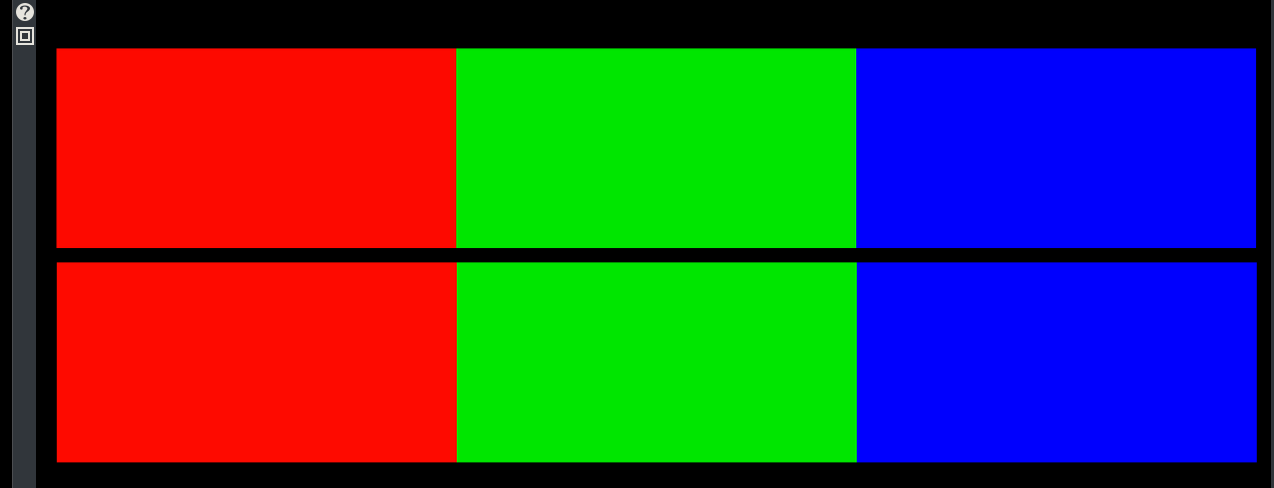
In the CinGG Compositor, I don't see any difference. This fact does not limit color accuracy only when the source files are sRGB. Any other color space is reduced to sRGB, so we end up performing color correction based on an inaccurate monitor display; consequently, the corrections made would lead to an even greater discrepancy (metamerism). With BT.709, the difference may be acceptable since the gamut is the same and only the brightness (gamma) changes. With wide-gamut color spaces, the difference becomes unacceptable. What I still need to figure out is: why does changing the “YUV color space” affect the view in the Compositor? If we only ever see sRGB on the monitor, it should always look the same, and this setting would be useless (unlike “YUV color range,” which I understand does make a difference). Now I’ll try compiling with lcms2, using P3 and OCIO images, and the new parameters for zscale, to see if anything changes. I’ll let you know tomorrow.[image: Wide_Vs_sRGB.png]
On Thu, Apr 30, 2026 at 10:32 PM Andrew Randrianasulu < randrianasulu@gmail.com> wrote:
On Thu, Apr 30, 2026 at 10:17 PM Andrea paz <gamberucci.andrea@gmail.com> wrote:
In my opinion, the behavior you've noticed indicates that CinGG is sending only sRGB signals to the monitor. It's not a matter of whether or not color management is enabled. I have wide-gamut ICC profiles set system-wide, so CinGG (or any other program) should display a wide-gamut signal if it passed the signal through unaltered, but CinGG limits it to sRGB. I’m attaching an image taken from the website https://www.wide-gamut.com/test, similar to the ChromaChecker you posted.
Interestingly THIS specific webpage does not claim my monitor support anything higher than sRGB, I see now "W" and no differently-colored squares. So may be it implemented differently, or demand much better monitor than I have. Previous page I found probably just highlighted than my monitor a bit better than sRGB. But not as wide as yours. I wonder if Adobe P3 and DCI P3 makes big difference ? I think your monitor more likely set for Adobe P3 photo, as opposed to P3 DCI (theatre)
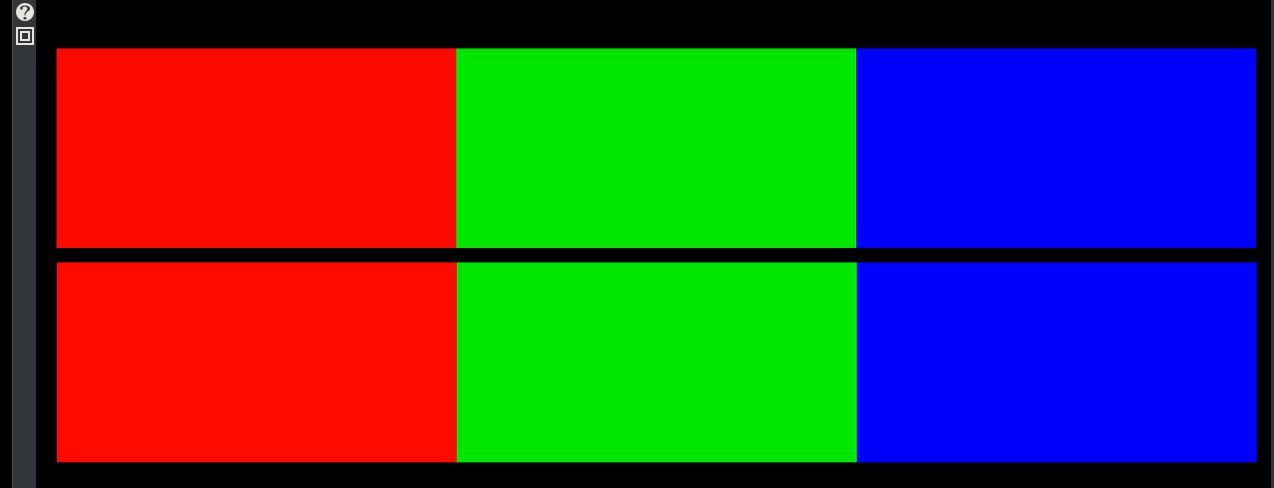
The top color strip is wide-gamut (ProPhotoRGB); the bottom strip is sRGB.
On the linked webpage, since I have a wide-gamut monitor, I can clearly see the difference between the two images: the top one is much more saturated and vibrant.
May be icc profile embedded in image only works in color-managed apps like browsers, image viewers ...
Does it look better (than in cingg) with mpv? in other video editors based on ffmpeg ?
I think we not just do not apply display part of icc (monitor profile) but also file part ...
I think video terms like full/limited range does not interact directly with terms like sRGB.
In the CinGG Compositor, I don't see any difference. This fact does not limit color accuracy only when the source files are sRGB. Any other color space is reduced to sRGB, so we end up performing color correction based on an inaccurate monitor display; consequently, the corrections made would lead to an even greater discrepancy (metamerism). With BT.709, the difference may be acceptable since the gamut is the same and only the brightness (gamma) changes. With wide-gamut color spaces, the difference becomes unacceptable. What I still need to figure out is: why does changing the “YUV color space” affect the view in the Compositor? If we only ever see sRGB on the monitor, it should always look the same, and this setting would be useless (unlike “YUV color range,” which I understand does make a difference). Now I’ll try compiling with lcms2, using P3 and OCIO images, and the new parameters for zscale, to see if anything changes. I’ll let you know tomorrow.[image: Wide_Vs_sRGB.png]
I couldn't compile libopencolorio and lcms2; ./configure doesn't recognize them as valid. Not even when using --with instead of --enable. I already have the packages in Arch because they're installed as dependencies for other programs. Your new ZScale configuration also works when you change the output parameters, but the screen goes black if you touch the input parameters... F_colorspace, on the other hand, works without any issues. I tried loading ProPhotoRGB and sRGB images in Kdenlive, GIMP, and Inkscape. Just like in CinGG, I don’t see any differences. However, in Gwenview (KDE’s image viewer) and Krita, I can see the difference. I’d say my assumption that CinGG reduces any color space to sRGB isn’t valid. As you said, there may be other reasons.. PS: I think my monitor is actually DCI P3 (98%) and not Adobe P3. It should also be 85% Rec.2020. https://www.displayspecifications.com/en/model/43583a9
On Fri, May 1, 2026 at 2:34 PM Andrea paz <gamberucci.andrea@gmail.com> wrote:
I couldn't compile libopencolorio and lcms2; ./configure doesn't recognize them as valid. Not even when using --with instead of --enable. I already have the packages in Arch because they're installed as dependencies for other programs.
Sorry, I did not wired them to main configure yet. I use this line in Slackbuild EXTRA_LIBS=" -lOpenCL -lSvtAv1Enc -ldav1d -lxvidcore -lass -lbluray -lsnappy -lshaderc_shared -llcms2 -lOpenColorIO" \ FFMPEG_EXTRA_CFG=" --disable-doc --enable-libopencolorio --enable-lcms2 --enable-opencl --enable-libsvtav1 --enable-frei0r \ --enable-libdav1d --enable-libxvid --enable-libass --enable-libbluray --enable-libsnappy --disable-debug --extra-cflags=-I/usr/local/include/vpl --extra-cflags=-I/usr/include/svt-av1" \ Just export them as env variables before configure?
Your new ZScale configuration also works when you change the output parameters, but the screen goes black if you touch the input parameters... F_colorspace, on the other hand, works without any issues.
I tried loading ProPhotoRGB and sRGB images in Kdenlive, GIMP, and Inkscape. Just like in CinGG, I don’t see any differences. However, in Gwenview (KDE’s image viewer) and Krita, I can see the difference. I’d say my assumption that CinGG reduces any color space to sRGB isn’t valid. As you said, there may be other reasons..
PS: I think my monitor is actually DCI P3 (98%) and not Adobe P3. It should also be 85% Rec.2020. https://www.displayspecifications.com/en/model/43583a9
On Fri, May 1, 2026 at 5:09 PM Andrea paz <gamberucci.andrea@gmail.com> wrote:
Just export them as env variables before configure?
I'm sorry, but I still can't compile them. The problem is that I can't get past simple copy-and-paste. I wonder where I'm going wrong...
I hope to make patch making this easier, like previous patches for zimg etc. But I guess it will happen not earlier than tomorrow ...
participants (2)
-
 Andrea paz
 -
 Andrew Randrianasulu