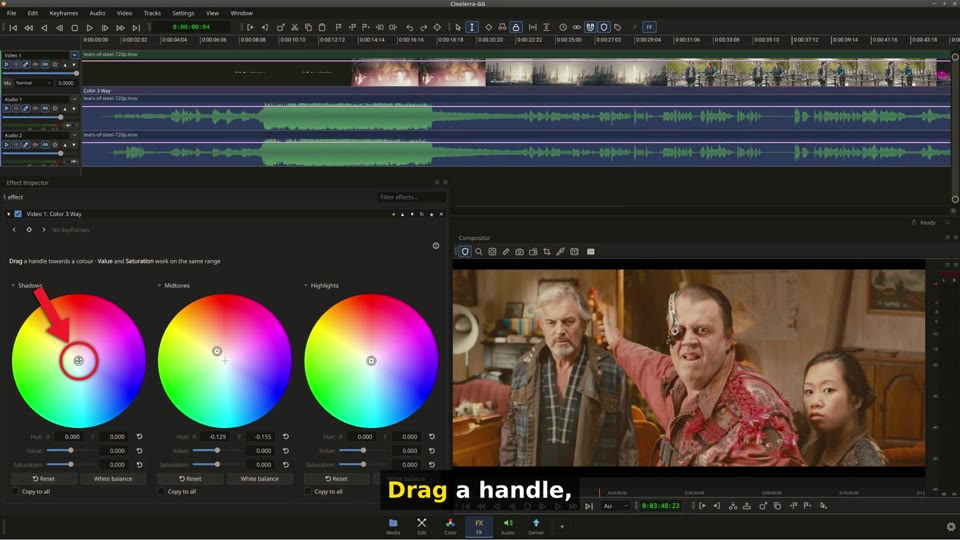
Hi everyone, a new Qt6 alpha is online, built on 2026-11-01. The main thing this time is a request: ten more effects have new native panels, and I would like you to test them thoroughly. It also brings a scene catalog and the fixes for what you reported since the last alpha. Download (sorted by date, the newest on top): download.cinelerra-gg.org <https://download.cinelerra-gg.org/?path=qt6-alpha&sort=date_desc> * CinGG-qt6-alpha-20261101-x86_64.AppImage <https://download.cinelerra-gg.org/files/qt6-alpha/CinGG-qt6-alpha-20261101-x86_64.AppImage>, sha256 |89fd92809b97d77e6250d5485ce68fd60bda2545cc1278410faf5a67e1696f7b| * CinGG-qt6-alpha-20261101-anylinux-x86_64.AppImage <https://download.cinelerra-gg.org/files/qt6-alpha/CinGG-qt6-alpha-20261101-anylinux-x86_64.AppImage> for older systems (it brings its own glibc), sha256 |b7baa004878e8781ba2207bed49536aeb55094bd378f7716d74711845f3a8ab3| The source is public: git.cinelerra-gg.org <https://git.cinelerra-gg.org/?p=sam/cinelerra-gg-qt6.git;a=summary>, branch main. 1. New effect panels: please test them thoroughly The controls of these ten effects now live in the Effect Inspector, with no extra window: BoxBlur, FindObj, Perspective, Chroma key, Chroma key (HSV), Chroma key (Avid), Motion, Color 3 Way, Histogram and Histogram Bezier. Sketcher, CriKey and Tracer came earlier in the same style, and nineteen effects such as Blur, Sharpen and Wave have a common layout with sliders and number fields. That makes 32 video effects with native panels. The others still show their old controls. Video, 1:56, English with subtitles: the effect panels and what to check <https://download.cinelerra-gg.org/files/qt6-alpha/videos/cinelerra-qt6-effect-panels.mp4> Video, 1:56, English with subtitles: the effect panels and what to check <https://download.cinelerra-gg.org/files/qt6-alpha/videos/cinelerra-qt6-effect-panels.mp4> The automatic tests run the real program, but they can't replace your eye and your own footage. Please check above all: * Every control: does it do what it did in the old window? * Old projects with these effects: do they open and look the same? * Keyframes, undo, playback and rendering, also with several effects on one track. To compare, the old window of these ten effects is still there. Start the AppImage with a variable, for example |CIN_PERSPECTIVE_LEGACY_WINDOW=1|. The others are |CIN_BOXBLUR_LEGACY_WINDOW|, |CIN_FINDOBJ_LEGACY_WINDOW|, |CIN_CHROMAKEY_LEGACY_WINDOW|, |CIN_CHROMAKEYHSV_LEGACY_WINDOW|, |CIN_CHROMAKEYAVID_LEGACY_WINDOW|, |CIN_MOTION_LEGACY_WINDOW|, |CIN_COLOR3WAY_LEGACY_WINDOW|, |CIN_HISTOGRAM_LEGACY_WINDOW| and |CIN_HISTOGRAM_BEZIER_LEGACY_WINDOW|. When you find something, please tell me which effect, what you did and what you saw. Already known, no need to report: * Perspective: when the picture fills the compositor, the corner handles sit on its edge. Press on the inner half of a handle. A handle on the divider to the meters can move the divider instead, so make the compositor a little wider. * After Attach Effect the clock in the main window can show a wrong time. The clock of the compositor is right. 2. Scene catalog Right-click a file in Resources and choose Detect Scenes. Cinelerra looks for hard cuts, and Create clips makes one clip for each checked scene. Nothing is copied or rendered, a clip only points to its part of the file. In the video, the twelve minutes of Tears of Steel gave 138 scenes in 42 seconds. Every clip has a card with categories, role, shot size, keywords and the transcript, if the file was transcribed. Classify fills these fields on your own computer: people, animals, interior, exterior, shot size and a short description. What you set by hand stays. The models are not part of Cinelerra. The first time, a dialog shows the size, the source and the licence of each one, and nothing is downloaded until you say so. It's 2.5 GB, once. The run took between four and five seconds for each scene on 16 cores. It does make mistakes: in the video it calls a robot an animal, and one click on the card fixes that. It finds hard cuts only, not fades or dissolves, and the descriptions are in English only. The catalog is also open to AI assistants through the remote control. The video ends with a real run of Claude Code, which picked scenes from the descriptions alone and says so. Video, 4:30, English with subtitles: scenes, catalog, classifying, an AI edit <https://download.cinelerra-gg.org/files/qt6-alpha/videos/cinelerra-qt6-scene-catalog.mp4> Video, 4:30, English with subtitles: scenes, catalog, classifying, an AI edit <https://download.cinelerra-gg.org/files/qt6-alpha/videos/cinelerra-qt6-scene-catalog.mp4> Also new: the OpenCV ObjectMask effect has a Download model button for a newer model, and a short clip on the timeline can always be dragged at its middle, with its trim modes on a bar outside the clip. The film in both videos is Tears of Steel, (CC) Blender Foundation, mango.blender.org, licensed CC BY 3.0. All videos with .srt subtitles: qt6-alpha/videos <https://download.cinelerra-gg.org/?path=qt6-alpha%2Fvideos>. 3. Fixes from your reports Igor: * Proxy: the project kept its size when a proxy was switched on, and switching it off afterwards doubled the size, 720x576 became 1440x1152. The P button did nothing at all, and Off in the dialog left the proxy files in the edits. Now 1/2 turns 720x576 into 360x288, and the P button, Ctrl+R and Off in the dialog all bring back 720x576 with the original files. This also holds for a project saved with the proxy on and loaded again. * One visible change: a scale the project size does not divide by is now grey. 1080/16 would come back as 1088 instead of 1080. On a 1920x1080 YUV project that leaves 1/2 and 1/4, the same rule the classic dialog uses for its list. * Mixer Viewer: the Mx button had no function yet. Now Shift+M opens an empty mixer, Mx on a video track links the track, and the mixer comes to the front with the picture. It follows the transport and the link is saved with the project. I tested this with one mixer and one video track, not with a real multi camera project, so please tell me what you find there. Andrea: * Dragging from the floating Resources window under Wayland: a program does not know where its windows are there, so the drag could not find the timeline from another window. In that case it now goes through the display server. In a nested KWin session, an effect reached the track in both modes of Floating panels. I only tested on KWin, so please check it on your desktop. * av1_vaapi and vp9_vaapi: this is not a bug in Cinelerra. As far as I can find, your RX 5700 XT has VCN 2.0, which encodes only H.264 and HEVC. VP9 is decode only, and AV1 encoding arrived with VCN 4.0. "No usable encoding profile" is what the driver answers in that case. Also: the anylinux AppImage starts on native Wayland now. Before, it stopped at the start when Display platform was set to Wayland. Cheers, Sam